
A useful reference pitch
A4 at 440 Hz (example)
1A4
2440 Hz
Reference A can vary by ensemble and repertoire; set the requested frequency if your app supports it.
A practical tuning fork app guide for iPhone and iPad. Learn the reference notes, follow the tuning process and explore real Daikyouju apps.
A reference tone is a useful practice companion when developing your ear or preparing a part before playing. Tuning-fork apps can help you hear a target pitch rather than relying solely on a visual meter.
A4 at 440 Hz (example)
Reference A can vary by ensemble and repertoire; set the requested frequency if your app supports it.
Tuning Fork Pro is Daikyouju’s dedicated reference-pitch utility. Read its App Store listing for the exact available tones and current device compatibility.
Practice note: Listen to the reference and then your instrument, making small adjustments as you compare the pitches.
Follow these steps using the app and your instrument. They are general guidance, not a claim that every interface has identical buttons.
Decide which note or pitch standard is required for your practice or ensemble.
Select an available pitch or frequency in the app. Available controls can differ by version.
Start low, especially with headphones and sustained tones, and increase only as needed.
Play or sing your own note after the reference. Compare carefully rather than trying to match by force.
After several repetitions, try to identify the reference using your ear before checking a visual tuner.
Uncropped, original App Store promotional screenshots delivered from Apple's CDN. Each image opens in full size.
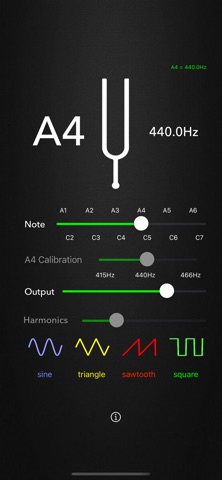 Tuning Fork ProiPhone · View full image ↗
 Tuning Fork ProiPhone · View full image ↗
 Tuning Fork ProiPad · View full image ↗
 Tuning Fork ProiPad · View full image ↗
Swipe or scroll sideways to explore
Compare the editions using features from each app's published catalog. App Store listings remain the source of truth for current pricing and compatibility.

Hear reference pitches and tune by ear.
A few common situations and practical ways to address them.
Your ensemble may use a different tuning reference; confirm the required frequency.
Alternate between the reference and your own note in short bursts.
Daikyouju Labs publishes dedicated music apps for iPhone and iPad. Compatibility, supported iOS/iPadOS versions and feature availability differ by app and may change; verify your device against the live App Store listing.
Compare the actual presets and features of the versions listed below. A Pro edition may offer additional tuning options or tools, but always confirm its current App Store description and price before downloading.
Start with the note sequence required by your instrument, arrangement or teacher. Listen to the reference and then your instrument, making small adjustments as you compare the pitches.
Keep learning and explore the tuners made for the music you play.
Browse all instrument guides →