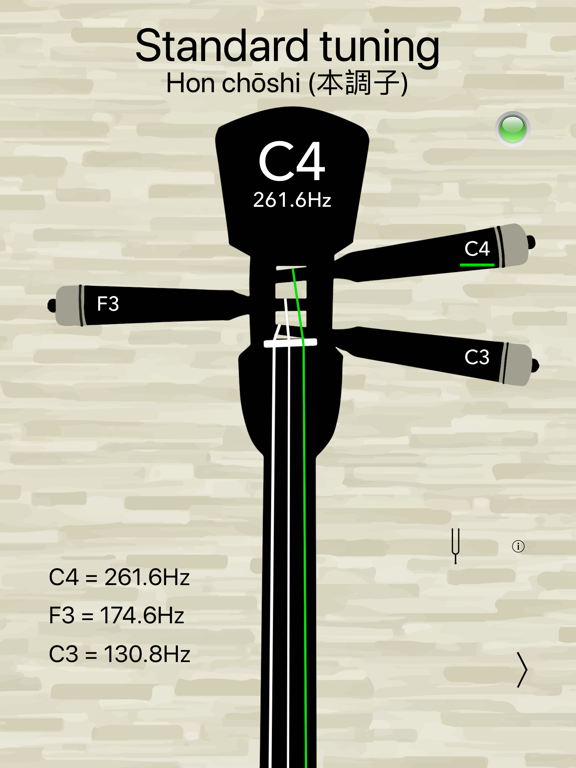
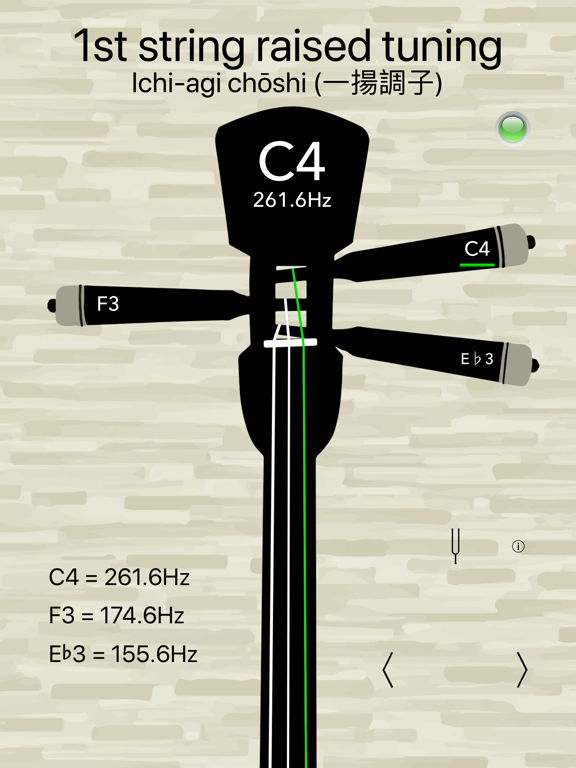
Select your sanshin mode
Match the selected traditional tuning
Honchoshi and other modes may use different pitch relationships; choose the appropriate mode and reference for your song.
A practical sanshin tuner guide for iPhone and iPad. Learn the reference notes, follow the tuning process and explore real Daikyouju apps.
The Okinawan sanshin is a three-string traditional instrument with distinct musical contexts and tuning approaches. A dedicated tuner can help you prepare for traditional repertoire without adapting a guitar layout.
Match the selected traditional tuning
Honchoshi and other modes may use different pitch relationships; choose the appropriate mode and reference for your song.
The Daikyouju Sanshin collection lists five tuning modes in its Basic and Pro editions, with frequency guidance and clear tuning feedback. Explore the specific versions and their App Store notes for up-to-date details.
Practice note: Check your intended sanshin tuning before changing string tension, especially when moving between traditional pieces.
Follow these steps using the app and your instrument. They are general guidance, not a claim that every interface has identical buttons.
Identify the exact instrument and string count. For alternate tunings, confirm the target notes before changing string tension.
Launch your sanshin tuner on iPhone or iPad. If prompted, allow microphone access and select the relevant available preset.
Pluck one open string cleanly, then wait briefly for the pitch reading to stabilize.
Compare the detected note with your target. Make gradual peg or machine-head adjustments; avoid overtightening and stop if resistance feels abnormal.
Check your intended sanshin tuning before changing string tension, especially when moving between traditional pieces. Play a familiar passage or chord afterward to confirm the result by ear.
Uncropped, original App Store promotional screenshots delivered from Apple's CDN. Each image opens in full size.
Swipe or scroll sideways to explore
Compare the editions using features from each app's published catalog. App Store listings remain the source of truth for current pricing and compatibility.
A dedicated Okinawan sanshin tuner.
Five sanshin tuning modes and precision guidance.
A few common situations and practical ways to address them.
Confirm the correct traditional tuning mode for the piece.
Use your teacher or repertoire as the pitch reference rather than a guitar layout.
Daikyouju Labs publishes dedicated music apps for iPhone and iPad. Compatibility, supported iOS/iPadOS versions and feature availability differ by app and may change; verify your device against the live App Store listing.
Compare the actual presets and features of the versions listed below. A Pro edition may offer additional tuning options or tools, but always confirm its current App Store description and price before downloading.
Start with the note sequence required by your instrument, arrangement or teacher. Check your intended sanshin tuning before changing string tension, especially when moving between traditional pieces.
Keep learning and explore the tuners made for the music you play.
Browse all instrument guides →